Agentify the Agent Assessment
In our previous discussion, we covered the core concepts of AgentBeats and explained how we can create “green agents” — agents designed to assess other agents. We also mentioned that many existing benchmarks require extra effort before they can be used to assess a given agent. However, it remains unclear exactly how much extra work this adaptation requires.
In this blog, we’ll take Tau-Bench as an example to explore why it’s important to standardize interfaces and agentify the assessment process, and how this can be effectively achieved.
Compatible with Any LLMs — But Not Any Agents
Tau-Bench is one of the most popular benchmarks for evaluating tool-use capabilities in agents. Its official GitHub repository provides comprehensive resources — including datasets, a well-defined simulation environment, and clear testing instructions. Through scenario simulations in two domains: Airline and Retail, Tau-Bench enables testing of agents built on different LLMs and using three major interaction strategies: tool calling, acting, and reacting. It also introduces an easy-to-compare metric, pass^k, which measures how reliably an agent can succeed across repeated trials in realistic conditions.
And here’s where the trouble begins. Suppose you have a new LLM — as long as it’s compatible with the OpenAI-style ChatCompletion API, you can easily run Tau-Bench tests with any of the provided strategies. However, things get tricky when you want to test an existing agent that fits into one or more of the following cases:
- It modifies the tool-calling prompts, or manually adds reasoning steps or workflows to improve performance.
- It adopts alternative strategies, such as Self-Ask or Tree-of-Thought.
- It has an internal multi-agent structure.
- It includes extra safety guardrails that you want to evaluate for their impact on performance.
- It uses a non-OpenAI LLM interface, or even manages context in a completely different way.
- It’s already packaged as a specialized API-based agent service.
If that sounds familiar — well, you’ve got some extra coding work ahead. (A) Instead of simply changing a model name or endpoint URL, you’ll need to dive into Tau-Bench’s internal codebase to understand how to implement an agent that fits its evaluation logic. (B) At the same time, you’ll need to dissect your own agent’s code or service — possibly bypassing production-layer wrappers, or writing new prompts to match Tau-Bench’s testing flow.
The most frustrating part? By the time you’ve aligned both sides and finally obtained your performance data, your heavily modified “test-mode agent” may no longer faithfully reflect the behavior of your real production system. Even worse, from this point on, you’re forced to maintain multiple versions of your agent interfaces — one that works with Tau-Bench, another for your production environment, and possibly more to accommodate other benchmarks that each come with their own unique formats and requirements.
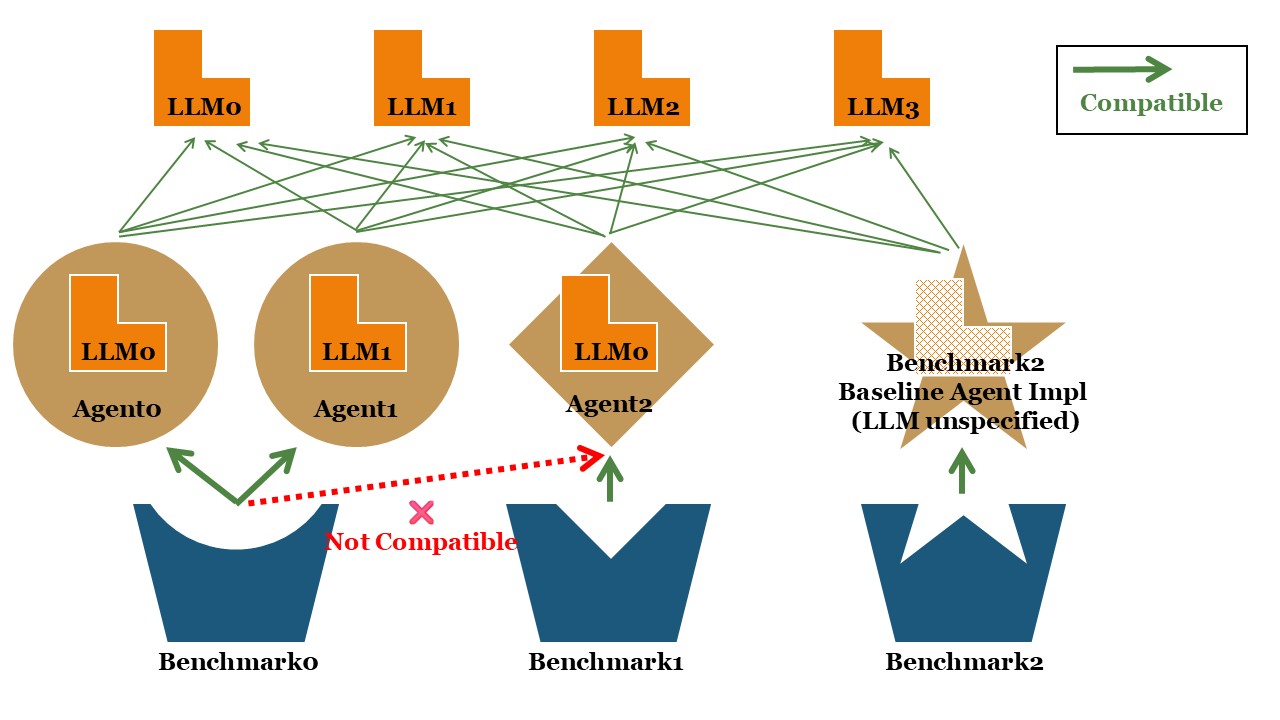
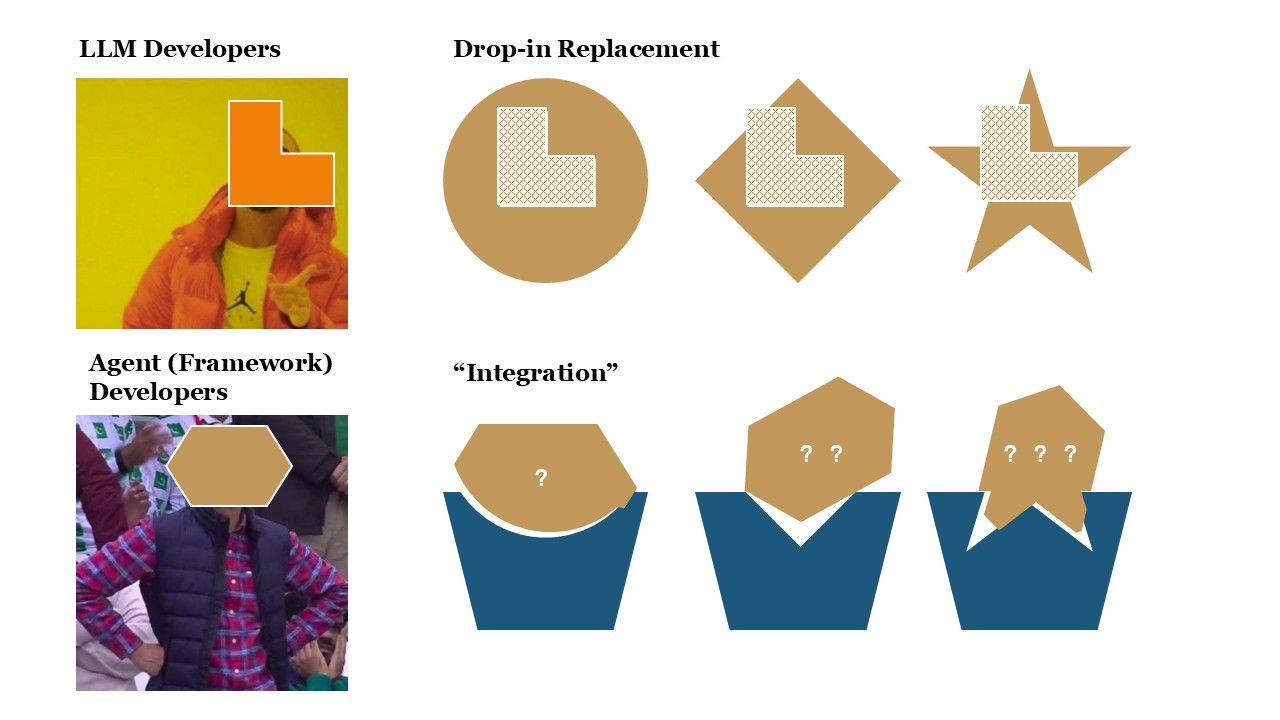
In fact, many agent benchmarks today share a similar design philosophy: you can easily swap out the underlying LLM for testing without changing much code, but the agent implementation itself is usually limited to one or just a few built-in options.
If you want to test a completely new agent implementation, there’s almost no way to avoid digging into the benchmark’s own source code. For example, when evaluating tool-use, you must know exactly how tools are called and reported; when testing web-browsing capabilities, you have to understand how web inputs and benchmark-specific browser actions are handled. Without careful integration, even small mismatches in test conditions can make the results unfair and non-comparable.
This creates a dilemma: either sacrifice coverage by limiting each benchmark to a few supported systems, or burden every agent developer with implementing multiple, incompatible test interfaces just to appear on different leaderboards—often under unfair or inconsistent evaluation setups. This fragmentation poses a serious challenge for both agent research and real-world development.
To move forward, we urgently need self-explanatory task specifications and standardized interfaces that keep testing and production environments consistent, improving the overall interoperability of the agent ecosystem.
Fortunately, there’s already existing work pointing in that direction. During the development of AgentBeats, we found that by combining two established standards—Google’s A2A and MCP—we can already cover most real-world scenarios:
- A2A handles top-level task distribution and communication between agents, or between agents and humans.
- MCP enables agents to interact with their environment in a consistent, extensible way whenever they need to.
By integrating these two standards, we can effectively standardize existing benchmarks and agentify the assessment—making the entire process reproducible, manageable, and unified under the same framework as managing agents themselves.
Next, we’ll use Tau-Bench as a concrete example to demonstrate how to apply A2A and MCP to build green and white agents, along with a fully standardized assessment pipeline.
What We Talk About When We Talk About Agentify
Let’s start by setting a few goals. In an ideal world, we envision a standardized, agentified version of Tau-Bench — one that fully adopts common agent standards.
- What We Aim to Upgrade
- Agent standardization: Any agent that supports the task-receiving interface defined in A2A should be able to participate in Tau-Bench testing naturally, without manual adaptation.
- Benchmark agentification: The assessment itself should be managed by an agent — one that can receive external instructions, coordinate the tests, and assess the performance of any A2A-compatible agent automatically.
- What We Aim to Preserve
- Consistency with the original benchmark: The transformed version should maintain metric values that are comparable to the original Tau-Bench, ensuring that results remain meaningful and trustworthy.
- One-command execution: The entire pipeline should remain simple to run — ideally executable with a single command, just like the original benchmark.
Now, let’s dive into the complete workflow of Tau-Bench and discuss how we can redesign it under the new “agentified” framework.
From a code perspective, a single run of Tau-Bench can be roughly broken down into the following steps:
- User Configuration via CLI: The user specifies two key configurations through the command-line interface (CLI):
- Environment configuration: defines the testing scenario (either Retail or Airline), the dataset to use, and the user model for simulating interactions.
- Agent configuration: defines the agent model and the chosen interaction strategy.
- Environment Initialization: The code then creates the corresponding testing environment based on these inputs. It calls the get_env function to instantiate the user simulator, and can optionally run tests in parallel to speed up evaluation.
- Agent Creation and Interaction: Next, the code initializes an agent factory, creates the target agent instance, and calls its .solve() interface to begin the interaction with the environment.
In the current Tau-Bench workflow, during the call to the .solve() interface, the environment instance (env) is responsible for executing the actions chosen by the agent or processing the agent’s text messages and simulating user responses. When the interaction ends — for example, when the agent calls a termination tool or the simulated user decides to end the session — the environment evaluates whether the task was completed successfully. This evaluation is based on two main criteria:
- The database state, i.e., whether it matches the expected final state exactly.
- The agent’s output, such as whether specific success-related strings appear in the responses.
Now, let’s design an A2A-based version of the benchmark that achieves the goals outlined earlier. The entire setup can be divided into three main modules:
- A green agent: responsible for managing the assessment. It receives upstream instructions specifying which agent to test and the corresponding environment configuration, then produces the final assessment results.
- A white agent: the target being tested. It receives and executes tool-use tasks. In general, the white agent should treat these tasks as if they were real production-level operations.
- An assessment launcher script: this component initiates the entire process. Much like in the original benchmark, it should start both agents, send the testing request to the green agent, and finally collect and present the assessment results.
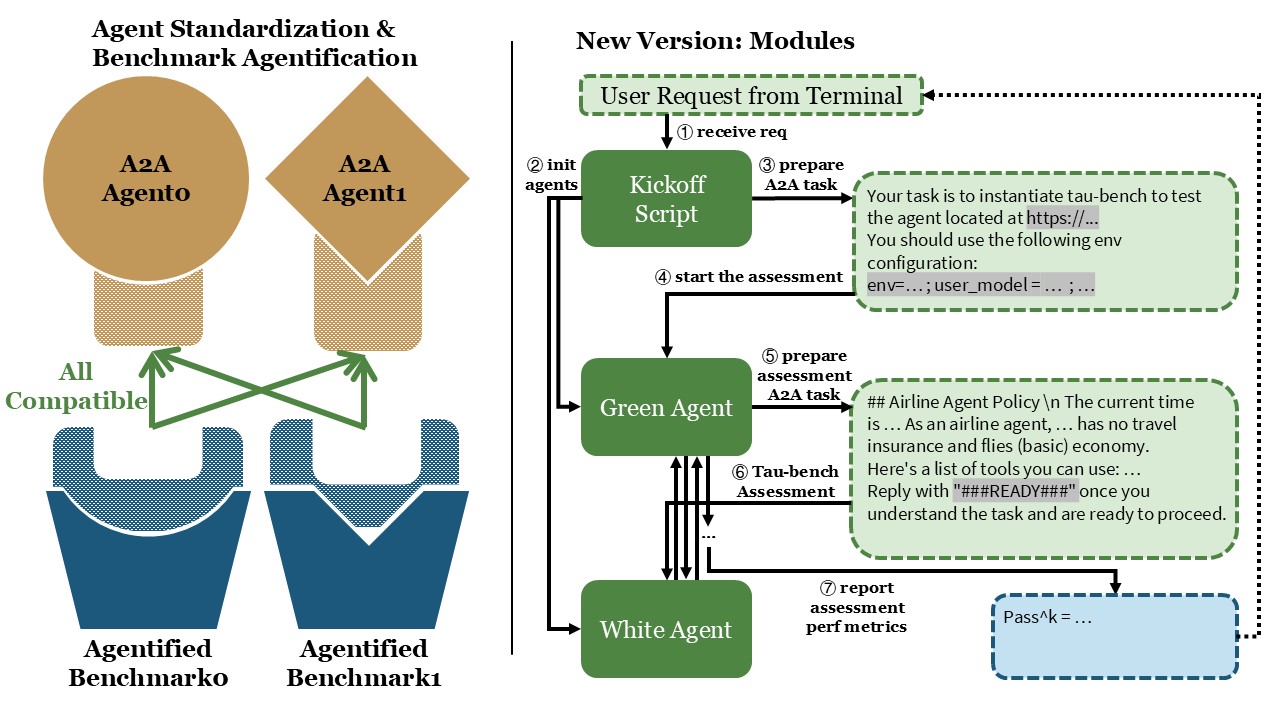
Now that we’ve outlined the overall architecture, let’s walk through the implementation details step by step.
A2A-Compatible Tau-bench Green Agent
The green agent receives an assessment task as input and returns the corresponding performance metrics as output.
For simplicity, let’s implement a Message-only Agent and manually hard-code the assessment workflow. This simplified version allows us to clearly illustrate how an A2A-compatible assessment agent can manage the benchmarking process end-to-end.
Note
Usually, for long-running operations such as benchmarking, it’s preferable to build task-generating or hybrid agents, and to use streaming or push notifications to track progress. However, since we aim to lower the entry barrier for green agents and make prompt-based green agents more convenient for reporting results, AgentBeats does not impose any restrictions on the green agent’s response type. Instead, it provides a platform-managed MCP to handle the management of reported metrics.
In this demonstration example, we intentionally avoid using the AgentBeats modules and simply use print statements to display the results for clarity.
For implementation, we build directly on top of the a2a-python library. Our approach is to migrate the evaluation flow from the original code and expand the parts where the agent is invoked.
The main challenge in this transition is handling tool calls correctly. In the original Tau-Bench, tool specifications are injected directly into LiteLLM’s completion interface. In our redesigned assessment, the green agent constructs the environment and can access tool metadata, while the white agent—the subject under test—does not (and should not) have direct knowledge of the tools. The key design question becomes: how can the green agent convey tool-related information to the white agent in a natural way without violating the production-like separation of concerns?
Here we discuss three potential approaches to handling this challenge:
(I) Require the White Agent to know in advance. One option is to hard-code the scenario and tool list directly inside the white agent, and limit the assessment to only those white agents specifically adapted for Tau-Bench. The advantage of this method is that it fully preserves the semantics of the original Tau-Bench, while cleanly separating the original environment and agent implementations. However, the downside is equally clear: imposing such specific requirements on the white agent completely contradicts our goal of improving interoperability. For that reason, we deliberately avoid this design.
(II) Have the Green Agent Send the Tool List in the First Message. In this approach, the green agent includes the tool list and a defined communication format in its initial message, enabling the white agent to adapt to the task through a standardized text-based interface. Compared with the first approach, this one remains simple, transparent, and highly interoperable, since any agent with a text interface can participate. Our example implementation adopts this method. Nevertheless, it also has two main drawbacks: (1) The additional prompts and formatting rules make the assessment slightly inconsistent with the original Tau-Bench and raise the comprehension demands on the tested agent. (2) Because tool usage is confined to text-level representations, this approach cannot fully test whether an agent has more advanced internal mechanisms for tool management.
(III) Green Agent with a Dynamic MCP Server. The third approach is for the green agent to create and manage a dedicated MCP server, dynamically granting the white agent access during the assessment. The white agent would then link to the MCP server and load new tools on the fly during execution. Although this method is more complex, it’s also the most ideal and extensible. To make it clearer, we’ll first elaborate on approach II before discussing this one in detail.
Once the design approach is finalized, the rest of the work follows a structure similar to the a2a tutorial. Using that as a foundation, we construct the code framework and migrate various components from the original Tau-Bench implementation.
To replace the completion interface, we introduce a new task description layer, which defines how the green agent communicates task objectives and tool call requests.
Here's a list of tools you can use (you can use at most one tool at a time):
{<tool information passed to white agent here>}
Please respond in the JSON format. Please wrap the JSON part with <json>...</json> tags.
The JSON should contain:
- "name": the tool call function name, or "{RESPOND_ACTION_NAME}" if you want to respond directly.
- "kwargs": the arguments for the tool call, or {{"content": "your message here"}} if you want to respond directly.

Next, I'll provide you with the user message and tool call results.
User message: <first user message here>
Additionally, we require the green agent to manage tasks using a context_id, and to parse both the task messages and the white agent’s replies, to stay as faithful as possible to the original evaluation flow. For metrics, we record whether the white agent successfully completes the assigned task (for demonstration, we only collect pass^1) and measure the total runtime, including the simulation overhead from the green agent itself. These metrics are reported as the final assessment results.
The implementation of the green agent can be found here.
A General White Agent
The design of the white agent’s tasks follows two key principles:
- Self-explanatory tasks: Each task should be clear and understandable on its own, without requiring any benchmark-specific knowledge or resources. As a reference, you can ask: If the same instructions were given to a human who had never heard of this benchmark, could they still complete the task successfully?
- Agent-friendly formatting: Within that self-explanatory framework, the task format should align as closely as possible with how agents naturally operate. This means using familiar markup languages, input/output formats, and structured prompts (e.g., offering multiple-choice options instead of open-ended responses whenever possible). Such consistency helps reduce formatting errors and string-matching noise, leading to more reliable assessment results.
In our approach II, we only require that the agent support text-based input and output. Therefore, in principle, any general-purpose agent implementation should be compatible with this assessment framework. For the demonstration purpose, we implemented a minimal LLM-based agent that manages dialogue using a context_id and communicates with the LLM through the LiteLLM interface. Importantly, and in strict accordance with Principle 1, our white agent includes no Tau-Bench-specific logic whatsoever.
The implementation of the white agent can be found here.
A Launcher Script for One-Line Kickoff
As mentioned earlier, to preserve the one-command evaluation feature of the original benchmark, we create a dedicated and lightweight launcher script. This script is responsible for starting both the green and white agents, and it uses the liveness of their agent cards to verify that each agent has been successfully initialized. Once both agents are up and running, the launcher script combines the assessment configuration with a complete task description, attaches the target white agent’s address, and sends everything to the green agent to kick off the entire assessment process — all with a single command.
Note
At kickoff, the green agent can receive either natural language or structured input — both are valid. The choice depends on whether the green agent’s execution logic is prompt-driven or code-driven.
- Prompt-driven green agents manage the entire execution flow through an LLM, so they require a natural language task description that the model can interpret directly.
- Code-driven green agents, on the other hand, can manually parse the upstream input and handle parameters programmatically, using structured data formats instead.
The approach II that is used in this blog actually falls into the code-driven category. While it technically only needs structured input, we deliberately kept the natural language layer to make it easier for readers to understand what information is being passed between the components.
After the assessment is complete, the script prints the assessment results received from the green agent, then terminates both agents to conclude the process. The output looks like this:
Response from green agent:
root=SendMessageSuccessResponse(id='c44cc887b37740ebb8d2c735c10e6997', jsonrpc='2.0', result=Message(context_id=None, extensions=None, kind='message', message_id='d17b02bf-8ad0-491c-b66a-d307cd0a92fb', metadata=None, parts=[Part(root=TextPart(kind='text', metadata=None, text="Finished. White agent success: ✅\nMetrics: {'time_used': 35.78928017616272, 'success': True}\n"))], reference_task_ids=None, role=<Role.agent: 'agent'>, task_id=None))
Evaluation complete. Terminating agents...
The implementation of the launcher script can be found here.
For the complete implementation, please refer to the repository: https://github.com/agentbeats/agentify-example-tau-bench.
Upgrade the Example Code
Congrats on completing your first agentified assessment! As you’ve seen, there’s plenty of room to improve the example. Possible enhancements include fully supporting all Tau-Bench configs (expanding main.py CLI options and passing them through), enabling more flexible agent response formats and streaming/push notifications, and adding white agents built with various ADKs (e.g., Google ADK, OpenAI Agent SDK). Beyond these routine upgrades, let’s focus on two more fundamental improvements:
- Use a live MCP to deliver tools instead of prompts (Approach III): In AgentBeats, we assume broad adoption of A2A and MCP as shared standards. Most agent SDKs support MCP-based tool calling, and many can dynamically load/refresh connected MCP services. If we implement Tau-Bench tools as a standalone MCP server, the green agent can launch this server at the start of the assessment and pass its address to the white agent. Any white agent that supports dynamic MCP loading can then use its native tool-calling logic in the test. Aside from slightly higher requirements on the white agent and a more complex code path, this approach is almost strictly better than Approach II. Interested readers can try implementing this design.
- Multiple/parallel tasks: Unlike the original Tau-Bench, our demo evaluates only a single task. For practical use, we should support many tasks and allow faster parallel assessment. Two sub-approaches:
- External parallelism: Run multiple assessments in parallel with different configs, restarting agents each time.
- Pros: Simple to implement; no isolation logic required inside the agents.
- Cons: Worse overall performance due to repeated startups.
- Internal parallelism: If the white agent supports isolation across tasks, modify the green agent to run multiple envs in parallel and aggregate metrics at the end.
- Pros: Performance overhead is roughly on par with the original Tau-Bench.
- Cons: Requires task isolation capabilities from the white agent.
- External parallelism: Run multiple assessments in parallel with different configs, restarting agents each time.
Finally, for long-running operations like multi-run or parallel testing, the current Message-only Agent style will naturally risk timeouts. It’s worth upgrading support for task-based responses and related capabilities alongside these changes.
Now I Have an Agentified Benchmark — What’s Next?
If you’ve followed along and built your agentified benchmark, you’ve probably noticed a few practical challenges:
- You need to set up the environment and run the code yourself, whether on a server or your own laptop.
- You have to register for an LLM service, get the necessary API keys, and track your own usage costs.
- You must understand the A2A protocol in detail to write runnable agents — you can’t just describe your intended evaluation flow in natural language to get a first draft — and you need to implement all agents and modules before running a full test.
- You must download the evaluation data. For Tau-Bench this isn’t bad — just a few megabytes from GitHub — but for large web-browsing benchmarks, it can mean several gigabytes or even tens of gigabytes.
- You need to manually manage debugging output and logs. When both the green and white agents run simultaneously, messages can easily get mixed up, or errors can be hidden behind subprocess layers.
- Similarly, you need to manually manage reported metrics — defining your own formats and doing extra manual work to compare results across runs and agents.
At the same time, you might have the additional need to:
- Share your green agent’s tests with others and see how their white agents perform.
- Dynamically deploy your agent when needed and automatically restart it after each assessment to ensure a clean state.
- Predefine default assessment configs, and reference them by alias during testing.
- Batch-assess multiple groups of agents automatically and view analysis results or a leaderboard.
- Load someone else’s green agent to develop your own white agent, or load someone else’s white agent to test your green agent.
Of course, assessment isn’t limited to single-white-agent benchmarks — you might even want a green agent to judge a chess match between two white agents, or orchestrate a multi-agent game of Werewolf!
These are exactly the kinds of problems AgentBeats aims to solve. By building a centralized platform that handles agent hosting and load balancing, LLM access management, assessment environment hosting, observability, leaderboards, agent registries, configuration management, and multi-agent assessments, and create an AgentBeats SDK for easy interaction and new agent development, we aim to make agent assessment truly open, standardized, and reproducible. In short, AgentBeats is designed to fully agentify agent assessment.
Luckily, you’re now familiar with how to build a complete A2A-based agent assessment workflow. To simplify all the challenges above — and unlock new platform-level capabilities — you’ll only need to make minor modifications to your existing code, and we’ll cover exactly how to do that in the next blog.
Stay tuned — and start agentifying the next benchmark you build today!